✨ New Arrivals Just Dropped!Explore
HomeStore

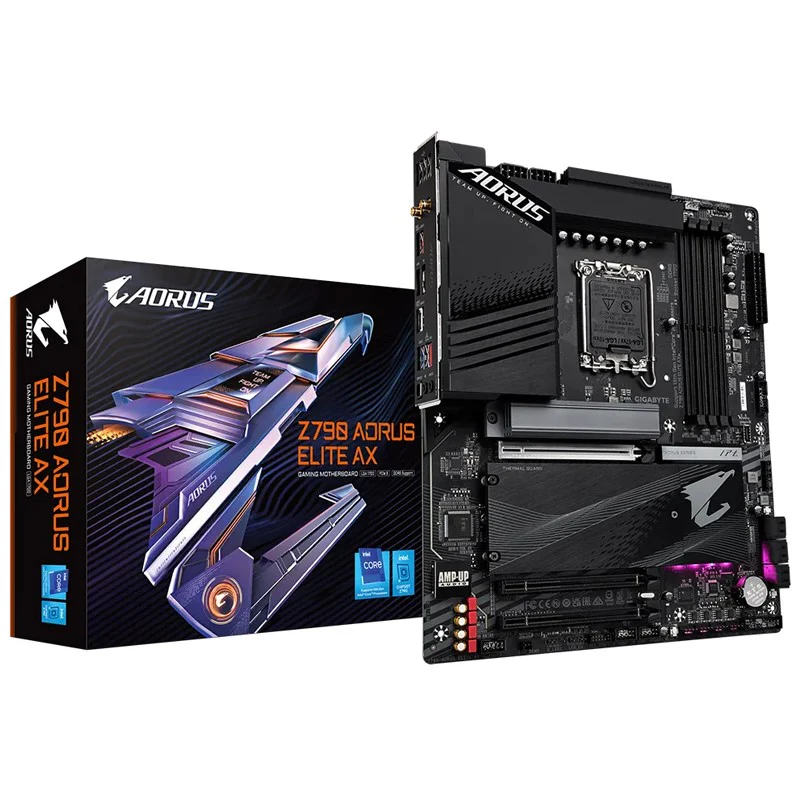
Gigabyte Z790 AORUS ELITE AX ATX Gaming Motherboard

Product image 1
1 / 3

Gigabyte Z790 AORUS ELITE AX ATX Gaming Motherboard

Gigabyte Z790 AORUS ELITE AX ATX Gaming Motherboard

Unparalleled Performance

With the fast-moving technology changes, GIGABYTE always follows the latest trends and provides customers with advanced features and latest technologies. GIGABYTE motherboards are equipped with upgraded power solution, latest storage standards and outstanding connectivity to enable optimized performance for gaming.

Twin Digital VRM Design

To ensure maximum Turbo Boost and overclocking performance of Intel's new generation CPU, GIGABYTE AORUS series motherboard equip the best VRM design ever built with the highest quality components.

RAID Storage

Triple 7G/s Gen4 M.2 PCIe SSDs in RAID 0

The exclusive 3 PCIe 4.0 M.2 from CPU and 2nd Generation 7000 MB/s SSD provides unparalleled Read/ Write performance up to 21053 and 15499 MB/s

GIGABYTE PerfDrive

PerfDrive technology integrates multiple GIGABYTE exclusive BIOS settings to allow users to balance between different levels of performance, power consumption, and temperature according to their needs easily when using 13th gen Intel® Core™ processors.

Outstanding Thermal Design

GIGABYTE Motherboards unparalleled performance is guaranteed by innovative and optimized thermal design to ensure the best CPU, Chipset, SSD stability and low temperatures under full load application and gaming performance.

4X Large Surface

Increased surface area up to 4X larger compared to traditional heatsinks. It improves heat dissipation from the MOSFETs.

Real One-piece Build

TMOS is a TRUE single piece heatsink. Its one-piece design and larger surface drastically improve the cooling performance against competitors’ multi-piece design.

Multi-Cut Design

TMOS features several channels and inlets on the heatsink. This design allows for the air flow to go through which leads to a great improvement of the heat transfer performance.

M.2 Thermal Guard III

M.2 Thermal Guard III constructed with 6X optimized heat dissipation surface to prevent throttling and bottleneck that high-speed/ large capacity of M.2 SSDs may cause, especially under heavy workload.The special design of heatsink grooves in the direction of CPU further enhances the in-chassis air flow and optimizes the heat convection efficiency.

Connectivity

GIGABYTE Motherboards enable the ultimate connection experience with blazing data-transfer speeds through the next generation network, storage, and Wi-Fi connectivity.

First adopter on 2.5GbE LAN onboard

2X Faster than ever

Adoption of 2.5G LAN provide up to 2.5GbE network connectivity, with at least 2 times faster transfer speeds compared to general 1GbE networking, perfectly designed for gamers with ultimate online gaming experience.

Support Multi-Gig(10/100/1000/2500Mbps) RJ-45 Ethernet

Connecting the Future - USB 3.2 Gen 2x2 Type-C

Featuring the USB 3.2 Gen 2x2 design which is doubled the performance than previous generation of USB 3.2 Gen 2. It works up to 20Gbps ultra-fast data transfer while connecting to USB 3.2 compliant peripherals. Through the USB Type-C® connector, users can enjoy the flexibility of reversible connection to access and store massive amounts of data rapidly.

Connecting The Future - Front USB3.2 Gen 2 Type-C

USB 3.2 Gen 2 provides USB 3.2 Gen 2 ports with speeds up to 10Gbps. With twice the bandwidth compared to its previous generation as well as backwards compatibility with USB 2.0 and USB 3.2 Gen1, the much improved USB 3.2 Gen 2 protocol is available over the new reversible USB Type-C™ and the traditional USB Type-A connector for better compatibility over a wider range of devices.

Audiophile Grade Capacitors (Premium Grade Audio)

To ensure a studio-quality experience, WIMA and Premium Grade Audio capacitors are used to provide power to the overall system.

Personalization

GIGABYTE motherboards bundle several useful and intuitive software to help users to control every aspect of motherboard and provide customizable lighting effect with outstanding aesthetics to fit your unique personality.

RGB Fusion Multi-Zone Light Show Design

Now offering more LED customizations than ever, users can truly adapt their PC to represent their lifestyle. With full RGB support and a redesigned RGB Fusion 2.0 application, the user has complete control over the LEDs which surround the motherboard.

UEFI BIOS

New User Interface

All new EASY MODE shows important hardware information in one page including CPU clock, Memory, Storage, Fan.

My Favorites

Add constantly used items into the favorite menu for quick access.

Storage Information

Show all kinds of storage information including SATA, PCIE and M.2 interface.

Changelog

List all changes before saving and exiting bios. Quickly review overall settings modification.

Intuitive Load Line Curve

Clearly show each loadline calibration setting in an intuitive curve graph.

GIGABYTE Control Center

GIGABYTE CONTROL CENTER (GCC) is a unified software for all GIGABYTE supported products. It provides newly designed intuitive user interface to control all essential function.

Unified software platform for all Gigabyte supported products

Intuitive user interface for an eased experience

Modularized control components only for installed hardware

Auto update function to keep system up to date and support future products

Multi-key

A multi-function reset button that can be reconfigured to other function in BIOS for different user scenarios.

RGB Switch

Turn off all lighting effect on motherboard.

Direct-To-BIOS

Boot into BIOS menu directly without pressing any keyboard button.

Safe Mode

Boot into BIOS safe mode to change specific option without losing other BIOS settings.

Ultra Durable

GIGABYTE Ultra Durable™ design provides product durability and high-quality manufacturing process. GIGABYTE motherboards use the best components and reinforce every slots to make each of them solid and durable.

EZ-Latch

With GIGABYTE EZ-Latch, you can DIY your PC in no time, quick and easy.

PCIe EZ-Latch

Unlock the latch of the PCIe slot easily when remove the graphics card in the PCIe slot.

Q-Flash Plus

Update the BIOS easily without installing the CPU, memory and graphics card.

With GIGABYTE Q-Flash Plus, you don't need to install the CPU, memory and graphics card nor enter the BIOS menu to flash the BIOS. Just download and save a new BIOS file (rename to gigabyte.bin) on the USB flash drive, then press the dedicated Q-Flash Plus button and you’re good to go!

STEP 1.

Plug 24pin & 8pin power supply cable on motherboard

STEP 2.

Download motherboard BIOS file and rename to "gigabyte.bin", save to USB flashdrive, and plug USB flashdrive into Q-Flash USB port

STEP 3.

Press Q-Flash Plus button, and motherboard will start updating BIOS automatically.

Specifications:

CPU

1. LGA1700 socket: Support for the 13th and 12th Generation Intel® Core™, Pentium® Gold and Celeron® Processors


2. L3 cache varies with CPU


(Please refer "CPU Support List" for more information.)

Chipset

1. Intel® Z790 Express Chipset

Memory

1. Support for DDR5 7600(O.C.) /7400(O.C.) /7200(O.C.) /7000(O.C.) /6800(O.C.) /6600(O.C.) / 6400(O.C.) / 6200(O.C.) / 6000(O.C.) / 5800(O.C.) / 5600(O.C.) / 5400(O.C.) / 5200(O.C.) / 4800 / 4000 memory modules


2. 4 x DDR DIMM sockets supporting up to 128 GB (32 GB single DIMM capacity) of system memory


3. Dual channel memory architecture


4. Support for ECC Un-buffered DIMM 1Rx8/2Rx8 memory modules (operate in non-ECC mode)


5. Support for non-ECC Un-buffered DIMM 1Rx8/2Rx8/1Rx16 memory modules


6. Support for Extreme Memory Profile (XMP) memory modules


(Please refer "Memory Support List" for more information.)

Onboard Graphics

Integrated Graphics Processor-Intel® HD Graphics support:


1. 1 x HDMI port, supporting a maximum resolution of 4096x2160@60 Hz


* Support for HDMI 2.0 version and HDCP 2.3.


2. 1 x DisplayPort, supporting a maximum resolution of 4096x2304@60


* Support for DisplayPort 1.2 version and HDCP 2.3


(Graphics specifications may vary depending on CPU support.)

Audio

1. Realtek® Audio CODEC


2. High Definition Audio


3. 2/4/5.1/7.1-channel


* You can change the functionality of an audio jack using the audio software. To configure 7.1-channel audio, access the audio software for audio settings.


4. Support for S/PDIF Out

LAN

1. Realtek® 2.5GbE LAN chip (2.5 Gbps/1 Gbps/100 Mbps)

Wireless Communication module

Intel® Wi-Fi 6E AX211


1. WIFI a, b, g, n, ac, ax, supporting 2.4/5/6 GHz carrier frequency bands


2. BLUETOOTH 5.3


3. Support for 11ax 160MHz wireless standard and up to 2.4 Gbps data rate


* Actual data rate may vary depending on environment and equipment.

Expansion Slots

CPU:


1. 1 x PCI Express x16 slot, supporting PCIe 5.0 and running at x16 (PCIEX16)


* For optimum performance, if only one PCI Express graphics card is to be installed, be sure to install it in the PCIEX16 slot.


Chipset:


1. 1 x PCI Express x16 slot, supporting PCIe 4.0 and running at x4 (PCIEX4_1)


2. 1 x PCI Express x16 slot, supporting PCIe 3.0 and running at x4 (PCIEX4_2)

Storage Interface

CPU:


1. 1 x M.2 connector (Socket 3, M key, type 22110/2280 PCIe 4.0 x4/x2 SSD support) (M2A_CPU)


Chipset:


1. 2 x M.2 connectors (Socket 3, M key, type 22110/2280 PCIe 4.0 x4/x2 SSD support) (M2P_SB, M2Q_SB)


2. 1 x M.2 connector (Socket 3, M key, type 22110/2280 SATA and PCIe 4.0 x4 SSD support) (M2M_SB)


3. 6 x SATA 6Gb/s connectors


RAID 0, RAID 1, RAID 5, and RAID 10 support for NVMe SSD storage devices


RAID 0, RAID 1, RAID 5, and RAID 10 support for SATA storage devices


* Refer to "2-8 Internal Connectors," for the installation notices for the M.2 and SATA connectors.

USB

Chipset:


1. 1 x USB Type-C® port on the back panel, with USB 3.2 Gen 2x2 support


2. 1 x USB Type-C® port with USB 3.2 Gen 2 support, available through the internal USB header


3. 2 x USB 3.2 Gen 2 Type-A ports (red) on the back panel


4. 5 x USB 3.2 Gen 1 ports (3 ports on the back panel, 2 ports available through the internal USB header)


Chipset+2 USB 2.0 Hubs:


1. 8 x USB 2.0/1.1 ports (4 ports on the back panel, 4 ports available through the internal USB headers)

Internal I/O Connectors

1. 1 x 24-pin ATX main power connector


2. 2 x 8-pin ATX 12V power connectors


3. 1 x CPU fan header


4. 1 x water cooling CPU fan header


5. 3 x system fan headers


6. 1 x system fan/water cooling pump header


7. 2 x addressable LED strip headers


8. 2 x RGB LED strip headers


9. 4 x M.2 Socket 3 connectors


10. 6 x SATA 6Gb/s connectors


11. 1 x front panel header


12. 1 x front panel audio header


13. 1 x USB Type-C® header, with USB 3.2 Gen 2 support


14. 1 x USB 3.2 Gen 1 header


15. 2 x USB 2.0/1.1 headers


16. 2 x Thunderbolt™ add-in card connectors


17. 1 x Trusted Platform Module header (For the GC-TPM2.0 SPI/GC-TPM2.0 SPI 2.0 module only)


18. 1 x reset button


19. 1 x Q-Flash Plus button


20. 1 x Clear CMOS button


21. 1 x reset jumper


22. 1 x Clear CMOS jumper

Back Panel Connectors

1. 1 x USB Type-C® port, with USB 3.2 Gen 2x2 support


2. 2 x USB 3.2 Gen 2 Type-A ports (red)


3. 3 x USB 3.2 Gen 1 ports


4. 4 x USB 2.0/1.1 ports


5. 2 x SMA antenna connectors (2T2R)


6. 1 x HDMI 2.0 port


7. 1 x DisplayPort


8. 1 x RJ-45 port


9. 1 x optical S/PDIF Out connector


10. 2 x audio jacks

I/O Controller

1. iTE® I/O Controller Chip

H/W Monitoring

1. Voltage detection


2. Temperature detection


3. Fan speed detection


4. Water cooling flow rate detection


5. Fan fail warning


6. Fan speed control


* Whether the fan (pump) speed control function is supported will depend on the fan (pump) you install.

BIOS

1. 1 x 256 Mbit flash


2. Use of licensed AMI UEFI BIOS


3. PnP 1.0a, DMI 2.7, WfM 2.0, SM BIOS 2.7, ACPI 5.0

Unique Features

1. Support for GIGABYTE Control Center (GCC)


* Available applications in GCC may vary by motherboard model. Supported functions of each application may also vary depending on motherboard specifications.


2. Support for Q-Flash


3. Support for Q-Flash Plus


4. Support for Smart Backup

Bundled Software

1. Norton® Internet Security (OEM version)


2. LAN bandwidth management software

Operating System

1. Support for Windows 11 64-bit


2. Support for Windows 10 64-bit

Form Factor

1. ATX Form Factor; 30.5cm x 24.4cm

Gigabyte Z790 AORUS ELITE AX ATX Gaming Motherboard

Unparalleled Performance

With the fast-moving technology changes, GIGABYTE always follows the latest trends and provides customers with advanced features and latest technologies. GIGABYTE motherboards are equipped with upgraded power solution, latest storage standards and outstanding connectivity to enable optimized performance for gaming.

Twin Digital VRM Design

To ensure maximum Turbo Boost and overclocking performance of Intel's new generation CPU, GIGABYTE AORUS series motherboard equip the best VRM design ever built with the highest quality components.

RAID Storage

Triple 7G/s Gen4 M.2 PCIe SSDs in RAID 0

The exclusive 3 PCIe 4.0 M.2 from CPU and 2nd Generation 7000 MB/s SSD provides unparalleled Read/ Write performance up to 21053 and 15499 MB/s

GIGABYTE PerfDrive

PerfDrive technology integrates multiple GIGABYTE exclusive BIOS settings to allow users to balance between different levels of performance, power consumption, and temperature according to their needs easily when using 13th gen Intel® Core™ processors.

Outstanding Thermal Design

GIGABYTE Motherboards unparalleled performance is guaranteed by innovative and optimized thermal design to ensure the best CPU, Chipset, SSD stability and low temperatures under full load application and gaming performance.

4X Large Surface

Increased surface area up to 4X larger compared to traditional heatsinks. It improves heat dissipation from the MOSFETs.

Real One-piece Build

TMOS is a TRUE single piece heatsink. Its one-piece design and larger surface drastically improve the cooling performance against competitors’ multi-piece design.

Multi-Cut Design

TMOS features several channels and inlets on the heatsink. This design allows for the air flow to go through which leads to a great improvement of the heat transfer performance.

M.2 Thermal Guard III

M.2 Thermal Guard III constructed with 6X optimized heat dissipation surface to prevent throttling and bottleneck that high-speed/ large capacity of M.2 SSDs may cause, especially under heavy workload.The special design of heatsink grooves in the direction of CPU further enhances the in-chassis air flow and optimizes the heat convection efficiency.

Connectivity

GIGABYTE Motherboards enable the ultimate connection experience with blazing data-transfer speeds through the next generation network, storage, and Wi-Fi connectivity.

First adopter on 2.5GbE LAN onboard

2X Faster than ever

Adoption of 2.5G LAN provide up to 2.5GbE network connectivity, with at least 2 times faster transfer speeds compared to general 1GbE networking, perfectly designed for gamers with ultimate online gaming experience.

Support Multi-Gig(10/100/1000/2500Mbps) RJ-45 Ethernet

Connecting the Future - USB 3.2 Gen 2x2 Type-C

Featuring the USB 3.2 Gen 2x2 design which is doubled the performance than previous generation of USB 3.2 Gen 2. It works up to 20Gbps ultra-fast data transfer while connecting to USB 3.2 compliant peripherals. Through the USB Type-C® connector, users can enjoy the flexibility of reversible connection to access and store massive amounts of data rapidly.

Connecting The Future - Front USB3.2 Gen 2 Type-C

USB 3.2 Gen 2 provides USB 3.2 Gen 2 ports with speeds up to 10Gbps. With twice the bandwidth compared to its previous generation as well as backwards compatibility with USB 2.0 and USB 3.2 Gen1, the much improved USB 3.2 Gen 2 protocol is available over the new reversible USB Type-C™ and the traditional USB Type-A connector for better compatibility over a wider range of devices.

Audiophile Grade Capacitors (Premium Grade Audio)

To ensure a studio-quality experience, WIMA and Premium Grade Audio capacitors are used to provide power to the overall system.

Personalization

GIGABYTE motherboards bundle several useful and intuitive software to help users to control every aspect of motherboard and provide customizable lighting effect with outstanding aesthetics to fit your unique personality.

RGB Fusion Multi-Zone Light Show Design

Now offering more LED customizations than ever, users can truly adapt their PC to represent their lifestyle. With full RGB support and a redesigned RGB Fusion 2.0 application, the user has complete control over the LEDs which surround the motherboard.

UEFI BIOS

New User Interface

All new EASY MODE shows important hardware information in one page including CPU clock, Memory, Storage, Fan.

My Favorites

Add constantly used items into the favorite menu for quick access.

Storage Information

Show all kinds of storage information including SATA, PCIE and M.2 interface.

Changelog

List all changes before saving and exiting bios. Quickly review overall settings modification.

Intuitive Load Line Curve

Clearly show each loadline calibration setting in an intuitive curve graph.

GIGABYTE Control Center

GIGABYTE CONTROL CENTER (GCC) is a unified software for all GIGABYTE supported products. It provides newly designed intuitive user interface to control all essential function.

Unified software platform for all Gigabyte supported products

Intuitive user interface for an eased experience

Modularized control components only for installed hardware

Auto update function to keep system up to date and support future products

Multi-key

A multi-function reset button that can be reconfigured to other function in BIOS for different user scenarios.

RGB Switch

Turn off all lighting effect on motherboard.

Direct-To-BIOS

Boot into BIOS menu directly without pressing any keyboard button.

Safe Mode

Boot into BIOS safe mode to change specific option without losing other BIOS settings.

Ultra Durable

GIGABYTE Ultra Durable™ design provides product durability and high-quality manufacturing process. GIGABYTE motherboards use the best components and reinforce every slots to make each of them solid and durable.

EZ-Latch

With GIGABYTE EZ-Latch, you can DIY your PC in no time, quick and easy.

PCIe EZ-Latch

Unlock the latch of the PCIe slot easily when remove the graphics card in the PCIe slot.

Q-Flash Plus

Update the BIOS easily without installing the CPU, memory and graphics card.

With GIGABYTE Q-Flash Plus, you don't need to install the CPU, memory and graphics card nor enter the BIOS menu to flash the BIOS. Just download and save a new BIOS file (rename to gigabyte.bin) on the USB flash drive, then press the dedicated Q-Flash Plus button and you’re good to go!

STEP 1.

Plug 24pin & 8pin power supply cable on motherboard

STEP 2.

Download motherboard BIOS file and rename to "gigabyte.bin", save to USB flashdrive, and plug USB flashdrive into Q-Flash USB port

STEP 3.

Press Q-Flash Plus button, and motherboard will start updating BIOS automatically.

Specifications:

CPU

1. LGA1700 socket: Support for the 13th and 12th Generation Intel® Core™, Pentium® Gold and Celeron® Processors


2. L3 cache varies with CPU


(Please refer "CPU Support List" for more information.)

Chipset

1. Intel® Z790 Express Chipset

Memory

1. Support for DDR5 7600(O.C.) /7400(O.C.) /7200(O.C.) /7000(O.C.) /6800(O.C.) /6600(O.C.) / 6400(O.C.) / 6200(O.C.) / 6000(O.C.) / 5800(O.C.) / 5600(O.C.) / 5400(O.C.) / 5200(O.C.) / 4800 / 4000 memory modules


2. 4 x DDR DIMM sockets supporting up to 128 GB (32 GB single DIMM capacity) of system memory


3. Dual channel memory architecture


4. Support for ECC Un-buffered DIMM 1Rx8/2Rx8 memory modules (operate in non-ECC mode)


5. Support for non-ECC Un-buffered DIMM 1Rx8/2Rx8/1Rx16 memory modules


6. Support for Extreme Memory Profile (XMP) memory modules


(Please refer "Memory Support List" for more information.)

Onboard Graphics

Integrated Graphics Processor-Intel® HD Graphics support:


1. 1 x HDMI port, supporting a maximum resolution of 4096x2160@60 Hz


* Support for HDMI 2.0 version and HDCP 2.3.


2. 1 x DisplayPort, supporting a maximum resolution of 4096x2304@60


* Support for DisplayPort 1.2 version and HDCP 2.3


(Graphics specifications may vary depending on CPU support.)

Audio

1. Realtek® Audio CODEC


2. High Definition Audio


3. 2/4/5.1/7.1-channel


* You can change the functionality of an audio jack using the audio software. To configure 7.1-channel audio, access the audio software for audio settings.


4. Support for S/PDIF Out

LAN

1. Realtek® 2.5GbE LAN chip (2.5 Gbps/1 Gbps/100 Mbps)

Wireless Communication module

Intel® Wi-Fi 6E AX211


1. WIFI a, b, g, n, ac, ax, supporting 2.4/5/6 GHz carrier frequency bands


2. BLUETOOTH 5.3


3. Support for 11ax 160MHz wireless standard and up to 2.4 Gbps data rate


* Actual data rate may vary depending on environment and equipment.

Expansion Slots

CPU:


1. 1 x PCI Express x16 slot, supporting PCIe 5.0 and running at x16 (PCIEX16)


* For optimum performance, if only one PCI Express graphics card is to be installed, be sure to install it in the PCIEX16 slot.


Chipset:


1. 1 x PCI Express x16 slot, supporting PCIe 4.0 and running at x4 (PCIEX4_1)


2. 1 x PCI Express x16 slot, supporting PCIe 3.0 and running at x4 (PCIEX4_2)

Storage Interface

CPU:


1. 1 x M.2 connector (Socket 3, M key, type 22110/2280 PCIe 4.0 x4/x2 SSD support) (M2A_CPU)


Chipset:


1. 2 x M.2 connectors (Socket 3, M key, type 22110/2280 PCIe 4.0 x4/x2 SSD support) (M2P_SB, M2Q_SB)


2. 1 x M.2 connector (Socket 3, M key, type 22110/2280 SATA and PCIe 4.0 x4 SSD support) (M2M_SB)


3. 6 x SATA 6Gb/s connectors


RAID 0, RAID 1, RAID 5, and RAID 10 support for NVMe SSD storage devices


RAID 0, RAID 1, RAID 5, and RAID 10 support for SATA storage devices


* Refer to "2-8 Internal Connectors," for the installation notices for the M.2 and SATA connectors.

USB

Chipset:


1. 1 x USB Type-C® port on the back panel, with USB 3.2 Gen 2x2 support


2. 1 x USB Type-C® port with USB 3.2 Gen 2 support, available through the internal USB header


3. 2 x USB 3.2 Gen 2 Type-A ports (red) on the back panel


4. 5 x USB 3.2 Gen 1 ports (3 ports on the back panel, 2 ports available through the internal USB header)


Chipset+2 USB 2.0 Hubs:


1. 8 x USB 2.0/1.1 ports (4 ports on the back panel, 4 ports available through the internal USB headers)

Internal I/O Connectors

1. 1 x 24-pin ATX main power connector


2. 2 x 8-pin ATX 12V power connectors


3. 1 x CPU fan header


4. 1 x water cooling CPU fan header


5. 3 x system fan headers


6. 1 x system fan/water cooling pump header


7. 2 x addressable LED strip headers


8. 2 x RGB LED strip headers


9. 4 x M.2 Socket 3 connectors


10. 6 x SATA 6Gb/s connectors


11. 1 x front panel header


12. 1 x front panel audio header


13. 1 x USB Type-C® header, with USB 3.2 Gen 2 support


14. 1 x USB 3.2 Gen 1 header


15. 2 x USB 2.0/1.1 headers


16. 2 x Thunderbolt™ add-in card connectors


17. 1 x Trusted Platform Module header (For the GC-TPM2.0 SPI/GC-TPM2.0 SPI 2.0 module only)


18. 1 x reset button


19. 1 x Q-Flash Plus button


20. 1 x Clear CMOS button


21. 1 x reset jumper


22. 1 x Clear CMOS jumper

Back Panel Connectors

1. 1 x USB Type-C® port, with USB 3.2 Gen 2x2 support


2. 2 x USB 3.2 Gen 2 Type-A ports (red)


3. 3 x USB 3.2 Gen 1 ports


4. 4 x USB 2.0/1.1 ports


5. 2 x SMA antenna connectors (2T2R)


6. 1 x HDMI 2.0 port


7. 1 x DisplayPort


8. 1 x RJ-45 port


9. 1 x optical S/PDIF Out connector


10. 2 x audio jacks

I/O Controller

1. iTE® I/O Controller Chip

H/W Monitoring

1. Voltage detection


2. Temperature detection


3. Fan speed detection


4. Water cooling flow rate detection


5. Fan fail warning


6. Fan speed control


* Whether the fan (pump) speed control function is supported will depend on the fan (pump) you install.

BIOS

1. 1 x 256 Mbit flash


2. Use of licensed AMI UEFI BIOS


3. PnP 1.0a, DMI 2.7, WfM 2.0, SM BIOS 2.7, ACPI 5.0

Unique Features

1. Support for GIGABYTE Control Center (GCC)


* Available applications in GCC may vary by motherboard model. Supported functions of each application may also vary depending on motherboard specifications.


2. Support for Q-Flash


3. Support for Q-Flash Plus


4. Support for Smart Backup

Bundled Software

1. Norton® Internet Security (OEM version)


2. LAN bandwidth management software

Operating System

1. Support for Windows 11 64-bit


2. Support for Windows 10 64-bit

Form Factor

1. ATX Form Factor; 30.5cm x 24.4cm

$311.92
Gigabyte Z790 AORUS ELITE AX ATX Gaming Motherboard
$311.92

Description

Gigabyte Z790 AORUS ELITE AX ATX Gaming Motherboard

Unparalleled Performance

With the fast-moving technology changes, GIGABYTE always follows the latest trends and provides customers with advanced features and latest technologies. GIGABYTE motherboards are equipped with upgraded power solution, latest storage standards and outstanding connectivity to enable optimized performance for gaming.

Twin Digital VRM Design

To ensure maximum Turbo Boost and overclocking performance of Intel's new generation CPU, GIGABYTE AORUS series motherboard equip the best VRM design ever built with the highest quality components.

RAID Storage

Triple 7G/s Gen4 M.2 PCIe SSDs in RAID 0

The exclusive 3 PCIe 4.0 M.2 from CPU and 2nd Generation 7000 MB/s SSD provides unparalleled Read/ Write performance up to 21053 and 15499 MB/s

GIGABYTE PerfDrive

PerfDrive technology integrates multiple GIGABYTE exclusive BIOS settings to allow users to balance between different levels of performance, power consumption, and temperature according to their needs easily when using 13th gen Intel® Core™ processors.

Outstanding Thermal Design

GIGABYTE Motherboards unparalleled performance is guaranteed by innovative and optimized thermal design to ensure the best CPU, Chipset, SSD stability and low temperatures under full load application and gaming performance.

4X Large Surface

Increased surface area up to 4X larger compared to traditional heatsinks. It improves heat dissipation from the MOSFETs.

Real One-piece Build

TMOS is a TRUE single piece heatsink. Its one-piece design and larger surface drastically improve the cooling performance against competitors’ multi-piece design.

Multi-Cut Design

TMOS features several channels and inlets on the heatsink. This design allows for the air flow to go through which leads to a great improvement of the heat transfer performance.

M.2 Thermal Guard III

M.2 Thermal Guard III constructed with 6X optimized heat dissipation surface to prevent throttling and bottleneck that high-speed/ large capacity of M.2 SSDs may cause, especially under heavy workload.The special design of heatsink grooves in the direction of CPU further enhances the in-chassis air flow and optimizes the heat convection efficiency.

Connectivity

GIGABYTE Motherboards enable the ultimate connection experience with blazing data-transfer speeds through the next generation network, storage, and Wi-Fi connectivity.

First adopter on 2.5GbE LAN onboard

2X Faster than ever

Adoption of 2.5G LAN provide up to 2.5GbE network connectivity, with at least 2 times faster transfer speeds compared to general 1GbE networking, perfectly designed for gamers with ultimate online gaming experience.

Support Multi-Gig(10/100/1000/2500Mbps) RJ-45 Ethernet

Connecting the Future - USB 3.2 Gen 2x2 Type-C

Featuring the USB 3.2 Gen 2x2 design which is doubled the performance than previous generation of USB 3.2 Gen 2. It works up to 20Gbps ultra-fast data transfer while connecting to USB 3.2 compliant peripherals. Through the USB Type-C® connector, users can enjoy the flexibility of reversible connection to access and store massive amounts of data rapidly.

Connecting The Future - Front USB3.2 Gen 2 Type-C

USB 3.2 Gen 2 provides USB 3.2 Gen 2 ports with speeds up to 10Gbps. With twice the bandwidth compared to its previous generation as well as backwards compatibility with USB 2.0 and USB 3.2 Gen1, the much improved USB 3.2 Gen 2 protocol is available over the new reversible USB Type-C™ and the traditional USB Type-A connector for better compatibility over a wider range of devices.

Audiophile Grade Capacitors (Premium Grade Audio)

To ensure a studio-quality experience, WIMA and Premium Grade Audio capacitors are used to provide power to the overall system.

Personalization

GIGABYTE motherboards bundle several useful and intuitive software to help users to control every aspect of motherboard and provide customizable lighting effect with outstanding aesthetics to fit your unique personality.

RGB Fusion Multi-Zone Light Show Design

Now offering more LED customizations than ever, users can truly adapt their PC to represent their lifestyle. With full RGB support and a redesigned RGB Fusion 2.0 application, the user has complete control over the LEDs which surround the motherboard.

UEFI BIOS

New User Interface

All new EASY MODE shows important hardware information in one page including CPU clock, Memory, Storage, Fan.

My Favorites

Add constantly used items into the favorite menu for quick access.

Storage Information

Show all kinds of storage information including SATA, PCIE and M.2 interface.

Changelog

List all changes before saving and exiting bios. Quickly review overall settings modification.

Intuitive Load Line Curve

Clearly show each loadline calibration setting in an intuitive curve graph.

GIGABYTE Control Center

GIGABYTE CONTROL CENTER (GCC) is a unified software for all GIGABYTE supported products. It provides newly designed intuitive user interface to control all essential function.

Unified software platform for all Gigabyte supported products

Intuitive user interface for an eased experience

Modularized control components only for installed hardware

Auto update function to keep system up to date and support future products

Multi-key

A multi-function reset button that can be reconfigured to other function in BIOS for different user scenarios.

RGB Switch

Turn off all lighting effect on motherboard.

Direct-To-BIOS

Boot into BIOS menu directly without pressing any keyboard button.

Safe Mode

Boot into BIOS safe mode to change specific option without losing other BIOS settings.

Ultra Durable

GIGABYTE Ultra Durable™ design provides product durability and high-quality manufacturing process. GIGABYTE motherboards use the best components and reinforce every slots to make each of them solid and durable.

EZ-Latch

With GIGABYTE EZ-Latch, you can DIY your PC in no time, quick and easy.

PCIe EZ-Latch

Unlock the latch of the PCIe slot easily when remove the graphics card in the PCIe slot.

Q-Flash Plus

Update the BIOS easily without installing the CPU, memory and graphics card.

With GIGABYTE Q-Flash Plus, you don't need to install the CPU, memory and graphics card nor enter the BIOS menu to flash the BIOS. Just download and save a new BIOS file (rename to gigabyte.bin) on the USB flash drive, then press the dedicated Q-Flash Plus button and you’re good to go!

STEP 1.

Plug 24pin & 8pin power supply cable on motherboard

STEP 2.

Download motherboard BIOS file and rename to "gigabyte.bin", save to USB flashdrive, and plug USB flashdrive into Q-Flash USB port

STEP 3.

Press Q-Flash Plus button, and motherboard will start updating BIOS automatically.

Specifications:

CPU

1. LGA1700 socket: Support for the 13th and 12th Generation Intel® Core™, Pentium® Gold and Celeron® Processors


2. L3 cache varies with CPU


(Please refer "CPU Support List" for more information.)

Chipset

1. Intel® Z790 Express Chipset

Memory

1. Support for DDR5 7600(O.C.) /7400(O.C.) /7200(O.C.) /7000(O.C.) /6800(O.C.) /6600(O.C.) / 6400(O.C.) / 6200(O.C.) / 6000(O.C.) / 5800(O.C.) / 5600(O.C.) / 5400(O.C.) / 5200(O.C.) / 4800 / 4000 memory modules


2. 4 x DDR DIMM sockets supporting up to 128 GB (32 GB single DIMM capacity) of system memory


3. Dual channel memory architecture


4. Support for ECC Un-buffered DIMM 1Rx8/2Rx8 memory modules (operate in non-ECC mode)


5. Support for non-ECC Un-buffered DIMM 1Rx8/2Rx8/1Rx16 memory modules


6. Support for Extreme Memory Profile (XMP) memory modules


(Please refer "Memory Support List" for more information.)

Onboard Graphics

Integrated Graphics Processor-Intel® HD Graphics support:


1. 1 x HDMI port, supporting a maximum resolution of 4096x2160@60 Hz


* Support for HDMI 2.0 version and HDCP 2.3.


2. 1 x DisplayPort, supporting a maximum resolution of 4096x2304@60


* Support for DisplayPort 1.2 version and HDCP 2.3


(Graphics specifications may vary depending on CPU support.)

Audio

1. Realtek® Audio CODEC


2. High Definition Audio


3. 2/4/5.1/7.1-channel


* You can change the functionality of an audio jack using the audio software. To configure 7.1-channel audio, access the audio software for audio settings.


4. Support for S/PDIF Out

LAN

1. Realtek® 2.5GbE LAN chip (2.5 Gbps/1 Gbps/100 Mbps)

Wireless Communication module

Intel® Wi-Fi 6E AX211


1. WIFI a, b, g, n, ac, ax, supporting 2.4/5/6 GHz carrier frequency bands


2. BLUETOOTH 5.3


3. Support for 11ax 160MHz wireless standard and up to 2.4 Gbps data rate


* Actual data rate may vary depending on environment and equipment.

Expansion Slots

CPU:


1. 1 x PCI Express x16 slot, supporting PCIe 5.0 and running at x16 (PCIEX16)


* For optimum performance, if only one PCI Express graphics card is to be installed, be sure to install it in the PCIEX16 slot.


Chipset:


1. 1 x PCI Express x16 slot, supporting PCIe 4.0 and running at x4 (PCIEX4_1)


2. 1 x PCI Express x16 slot, supporting PCIe 3.0 and running at x4 (PCIEX4_2)

Storage Interface

CPU:


1. 1 x M.2 connector (Socket 3, M key, type 22110/2280 PCIe 4.0 x4/x2 SSD support) (M2A_CPU)


Chipset:


1. 2 x M.2 connectors (Socket 3, M key, type 22110/2280 PCIe 4.0 x4/x2 SSD support) (M2P_SB, M2Q_SB)


2. 1 x M.2 connector (Socket 3, M key, type 22110/2280 SATA and PCIe 4.0 x4 SSD support) (M2M_SB)


3. 6 x SATA 6Gb/s connectors


RAID 0, RAID 1, RAID 5, and RAID 10 support for NVMe SSD storage devices


RAID 0, RAID 1, RAID 5, and RAID 10 support for SATA storage devices


* Refer to "2-8 Internal Connectors," for the installation notices for the M.2 and SATA connectors.

USB

Chipset:


1. 1 x USB Type-C® port on the back panel, with USB 3.2 Gen 2x2 support


2. 1 x USB Type-C® port with USB 3.2 Gen 2 support, available through the internal USB header


3. 2 x USB 3.2 Gen 2 Type-A ports (red) on the back panel


4. 5 x USB 3.2 Gen 1 ports (3 ports on the back panel, 2 ports available through the internal USB header)


Chipset+2 USB 2.0 Hubs:


1. 8 x USB 2.0/1.1 ports (4 ports on the back panel, 4 ports available through the internal USB headers)

Internal I/O Connectors

1. 1 x 24-pin ATX main power connector


2. 2 x 8-pin ATX 12V power connectors


3. 1 x CPU fan header


4. 1 x water cooling CPU fan header


5. 3 x system fan headers


6. 1 x system fan/water cooling pump header


7. 2 x addressable LED strip headers


8. 2 x RGB LED strip headers


9. 4 x M.2 Socket 3 connectors


10. 6 x SATA 6Gb/s connectors


11. 1 x front panel header


12. 1 x front panel audio header


13. 1 x USB Type-C® header, with USB 3.2 Gen 2 support


14. 1 x USB 3.2 Gen 1 header


15. 2 x USB 2.0/1.1 headers


16. 2 x Thunderbolt™ add-in card connectors


17. 1 x Trusted Platform Module header (For the GC-TPM2.0 SPI/GC-TPM2.0 SPI 2.0 module only)


18. 1 x reset button


19. 1 x Q-Flash Plus button


20. 1 x Clear CMOS button


21. 1 x reset jumper


22. 1 x Clear CMOS jumper

Back Panel Connectors

1. 1 x USB Type-C® port, with USB 3.2 Gen 2x2 support


2. 2 x USB 3.2 Gen 2 Type-A ports (red)


3. 3 x USB 3.2 Gen 1 ports


4. 4 x USB 2.0/1.1 ports


5. 2 x SMA antenna connectors (2T2R)


6. 1 x HDMI 2.0 port


7. 1 x DisplayPort


8. 1 x RJ-45 port


9. 1 x optical S/PDIF Out connector


10. 2 x audio jacks

I/O Controller

1. iTE® I/O Controller Chip

H/W Monitoring

1. Voltage detection


2. Temperature detection


3. Fan speed detection


4. Water cooling flow rate detection


5. Fan fail warning


6. Fan speed control


* Whether the fan (pump) speed control function is supported will depend on the fan (pump) you install.

BIOS

1. 1 x 256 Mbit flash


2. Use of licensed AMI UEFI BIOS


3. PnP 1.0a, DMI 2.7, WfM 2.0, SM BIOS 2.7, ACPI 5.0

Unique Features

1. Support for GIGABYTE Control Center (GCC)


* Available applications in GCC may vary by motherboard model. Supported functions of each application may also vary depending on motherboard specifications.


2. Support for Q-Flash


3. Support for Q-Flash Plus


4. Support for Smart Backup

Bundled Software

1. Norton® Internet Security (OEM version)


2. LAN bandwidth management software

Operating System

1. Support for Windows 11 64-bit


2. Support for Windows 10 64-bit

Form Factor

1. ATX Form Factor; 30.5cm x 24.4cm

Gigabyte Z790 AORUS ELITE AX ATX Gaming Motherboard | Blink